En este titular se estará detallando cada paso para diseñar esta pequeña aplicaciones.
Pantalla inicial
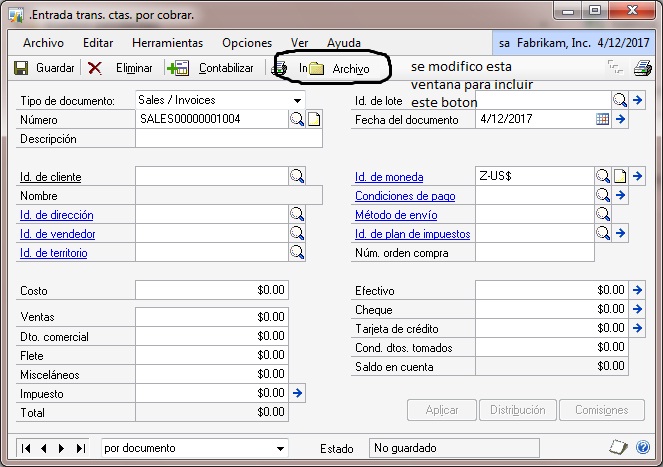
Luego de agregar esta pantalla a VBA estaré saltando la parte de agregar esta pantalla me saltare la parte de agregar esta ventana al editor de VB pues saber hacer esto es imprescindible.
En el editor de VB proceder con agregar las siguientes api
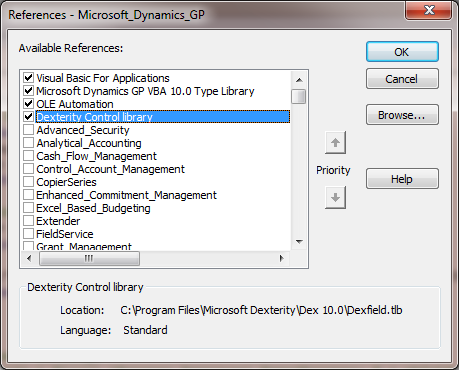
Luego de esto procederemos con agregar el siguiente Script
Option Explicit
Dim Bool As Boolean
Private Sub Importar_AfterUserChanged()
‘Define the main object
Dim objGPApp As New Dynamics.Application
‘Variable to Handle Returned Errors Flag
Dim intErrorValue As Integer
‘Variable to Handle Returned Errors Messages
Dim strErrorMessage As String
Dim oFSO As New FileSystemObject
Dim oFS
Dim sText As Variant
Dim iline As Integer
Dim batch As String
Dim Filepath As String
Dim answer As VbMsgBoxResult
If Bool = False Then
answer = MsgBox(«Esta seguro que desea Cargar el archivo con las facturas de las CXC?», vbExclamation + vbYesNo, «Confirmar»)
If answer = vbYes Then
Bool = True
Filepath = InputBox(«Digite la Direccion del archivo separado por coma:», «El Archivo debe ser TXT o CSV»)
If Filepath <> «» Then
If (oFSO.FileExists(Filepath)) Then
If (UCase(oFSO.GetExtensionName(Filepath)) = «TXT») Or (UCase(oFSO.GetExtensionName(Filepath)) = «CSV») Then
Set oFS = oFSO.OpenTextFile(Filepath)
intErrorValue = objGPApp.ExecuteSanscript(«open form ‘RM_Sales_Entry’;», strErrorMessage)
iline = 1
‘Crea el nombre del lote
batch = «Lote CXC » + CStr(Year(Date)) & CStr(Month(Date)) & CStr(Day(Date)) ‘& CStr(Hour(Time)) & CStr(Minute(Time)) & CStr(Second(Time))
‘lote CXC
intErrorValue = objGPApp.ExecuteSanscript(«open form ‘RM_Batch_Entry’;», strErrorMessage)
‘documento
intErrorValue = objGPApp.MoveToField(«‘Batch Number’ of window ‘RM_Batch_Entry’ of form ‘RM_Batch_Entry'»)
intErrorValue = objGPApp.SetDataValue(«‘Batch Number’ of window ‘RM_Batch_Entry’ of form ‘RM_Batch_Entry'», «lote» + CStr(Second(Time)))
‘documento
intErrorValue = objGPApp.MoveToField(«‘Origin’ of window ‘RM_Batch_Entry’ of form ‘RM_Batch_Entry'»)
intErrorValue = objGPApp.SetDataValue(«‘Origin’ of window ‘RM_Batch_Entry’ of form ‘RM_Batch_Entry'», 1)
‘descripcion
intErrorValue = objGPApp.MoveToField(«‘Batch Comment’ of window ‘RM_Batch_Entry’ of form ‘RM_Batch_Entry'»)
intErrorValue = objGPApp.SetDataValue(«‘Batch Comment’ of window ‘RM_Batch_Entry’ of form ‘RM_Batch_Entry'», batch)
‘Guardar
intErrorValue = objGPApp.ExecuteSanscript(«run script ‘Save Button’ of window ‘RM_Batch_Entry’ of form ‘RM_Batch_Entry’;», strErrorMessage)
intErrorValue = objGPApp.MoveToField(«‘Batch Comment’ of window ‘RM_Batch_Entry’ of form ‘RM_Batch_Entry'»)
‘Cerrar
intErrorValue = objGPApp.ExecuteSanscript(«close form ‘RM_Batch_Entry’;», strErrorMessage)
Do Until oFS.AtEndOfStream
sText = Split(oFS.ReadLine, «,»)
If iline > 1 Then
‘*************************************Transacciones ventas
‘documento
intErrorValue = objGPApp.MoveToField(«‘RM Document Number-WORK’ of window ‘RM_Sales_Entry’ of form ‘RM_Sales_Entry'»)
intErrorValue = objGPApp.SetDataValue(«‘RM Document Number-WORK’ of window ‘RM_Sales_Entry’ of form ‘RM_Sales_Entry'», sText(0))
‘descripcion
intErrorValue = objGPApp.MoveToField(«‘Document Description’ of window ‘RM_Sales_Entry’ of form ‘RM_Sales_Entry'»)
intErrorValue = objGPApp.SetDataValue(«‘Document Description’ of window ‘RM_Sales_Entry’ of form ‘RM_Sales_Entry'», sText(1))
‘cliente
intErrorValue = objGPApp.MoveToField(«‘Customer Number’ of window ‘RM_Sales_Entry’ of form ‘RM_Sales_Entry'»)
intErrorValue = objGPApp.SetDataValue(«‘Customer Number’ of window ‘RM_Sales_Entry’ of form ‘RM_Sales_Entry'», sText(2))
‘Fecha Documento
intErrorValue = objGPApp.MoveToField(«‘Document Date’ of window ‘RM_Sales_Entry’ of form ‘RM_Sales_Entry'»)
intErrorValue = objGPApp.SetDataValue(«‘Document Date’ of window ‘RM_Sales_Entry’ of form ‘RM_Sales_Entry'», sText(3))
‘Monto
intErrorValue = objGPApp.MoveToField(«‘Sales Amount’ of window ‘RM_Sales_Entry’ of form ‘RM_Sales_Entry'»)
intErrorValue = objGPApp.SetDataValue(«‘Sales Amount’ of window ‘RM_Sales_Entry’ of form ‘RM_Sales_Entry'», sText(4))
‘Monto
intErrorValue = objGPApp.MoveToField(«‘Tax Amount’ of window ‘RM_Sales_Entry’ of form ‘RM_Sales_Entry'»)
intErrorValue = objGPApp.ExecuteSanscript(«run script ‘Tax Amount’ of window ‘RM_Sales_Entry’ of form ‘RM_Sales_Entry’;», strErrorMessage)
intErrorValue = objGPApp.MoveToField(«‘Batch Number’ of window ‘RM_Sales_Entry’ of form ‘RM_Sales_Entry'»)
intErrorValue = objGPApp.SetDataValue(«‘Batch Number’ of window ‘RM_Sales_Entry’ of form ‘RM_Sales_Entry'», batch)
‘guardar
intErrorValue = objGPApp.ExecuteSanscript(«run script ‘Save Button’ of window ‘RM_Sales_Entry’ of form ‘RM_Sales_Entry’;», strErrorMessage)
‘Cerrar
‘ intErrorValue = objGPApp.ExecuteSanscript(«close form ‘RM_Sales_Entry’;», strErrorMessage)
End If
iline = iline + 1
Loop
oFS.Close
Set oFS = Nothing
MsgBox «Proceso de Integración Completado», vbInformation, «Proceso Finalizado»
Bool = False
Else
MsgBox «Extension Incorrecta»
Bool = False
End If
Else
MsgBox «Archivo no encontrado»
Bool = False
End If
End If
End If
End If
End Sub
Private Sub Importar_BeforeUserChanged(KeepFocus As Boolean, CancelLogic As Boolean)
End Sub
Private Sub Window_BeforeOpen(OpenVisible As Boolean)
Bool = False
End Sub